
A private AI assistant that lives on your Mac.
Nothing happens without your yes.
SafePersonalAI reads your email, messages and bank statements on your own Mac and prepares the to-dos, calendar entries and money overview. You approve each one. Your data is never sent to us: it stays on your Mac, and the AI runs there too with Ollama, or through your own AI provider account. Pay once, no subscription.
Free during the beta: every module is open for 90 days. After that, a one-time purchase: Base €19, Travel €15, Wealth €15 — or all three for €39. Buying opens soon. For Macs with Apple silicon (M1 or later). Use a local Ollama model with no cloud account, or your own Anthropic, OpenAI, or Gemini key.
To-do: send the signed form by Friday
Found in an email from the school office, with its deadline
Add “Dentist — 3 Sep, 15:00” to your calendar
Parsed from an iMessage you sent yourself
Track the electricity bill — €84.00, due 28 Oct
Read from the invoice email; a reminder comes before it is due
The real app
This is the app itself. Not a mock-up.
Five screens of SafePersonalAI as it runs on a Mac, filled with sample data. Shown here in English; the app's menus, headings and buttons can also be set to German, Turkish, Spanish, Chinese or French.
1 / 5
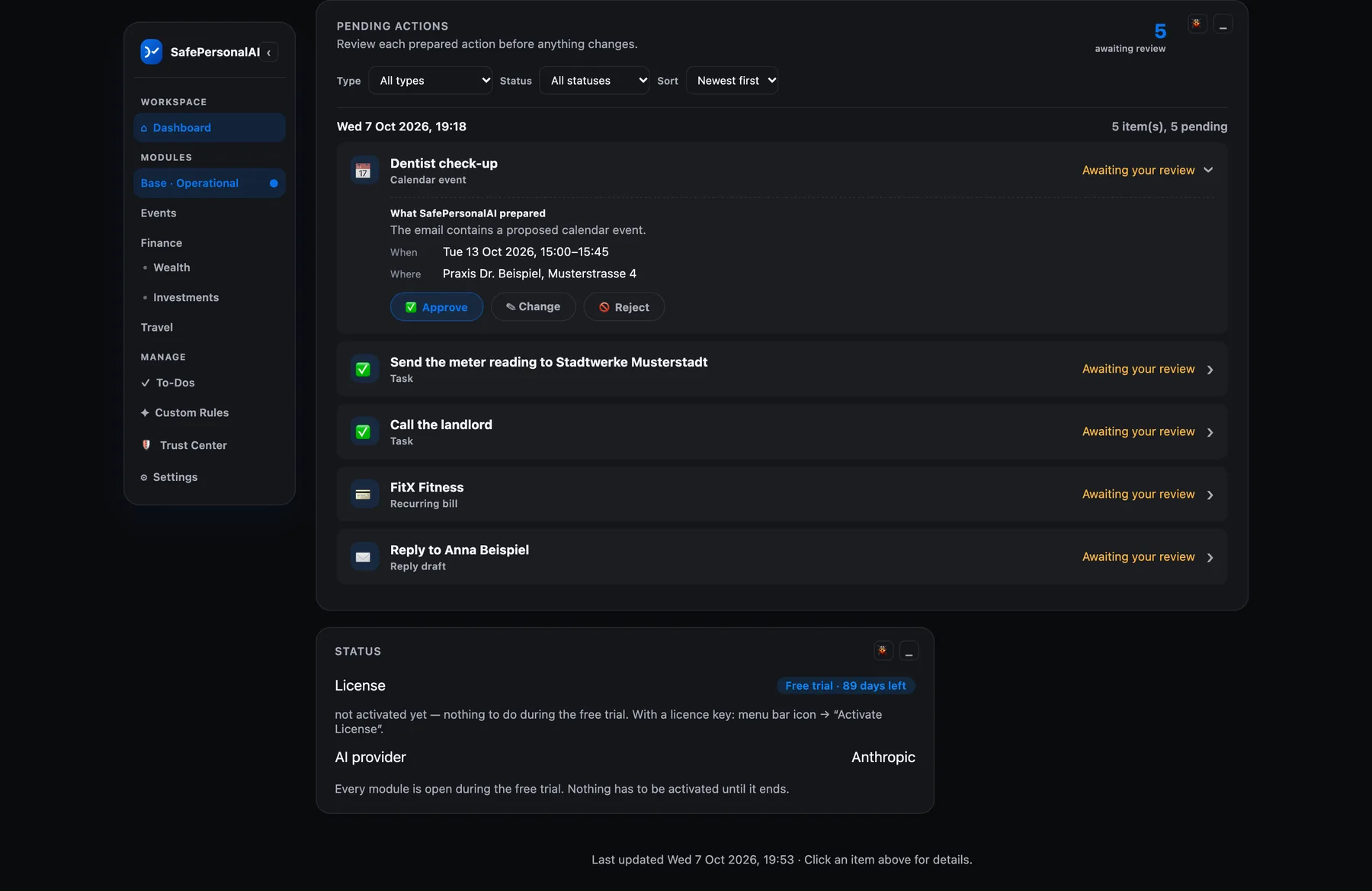
Nothing happens without your yes
What it found in your mail and messages waits here: an appointment, a to-do, a bill, a reply draft. You approve, change or reject each one.
2 / 5
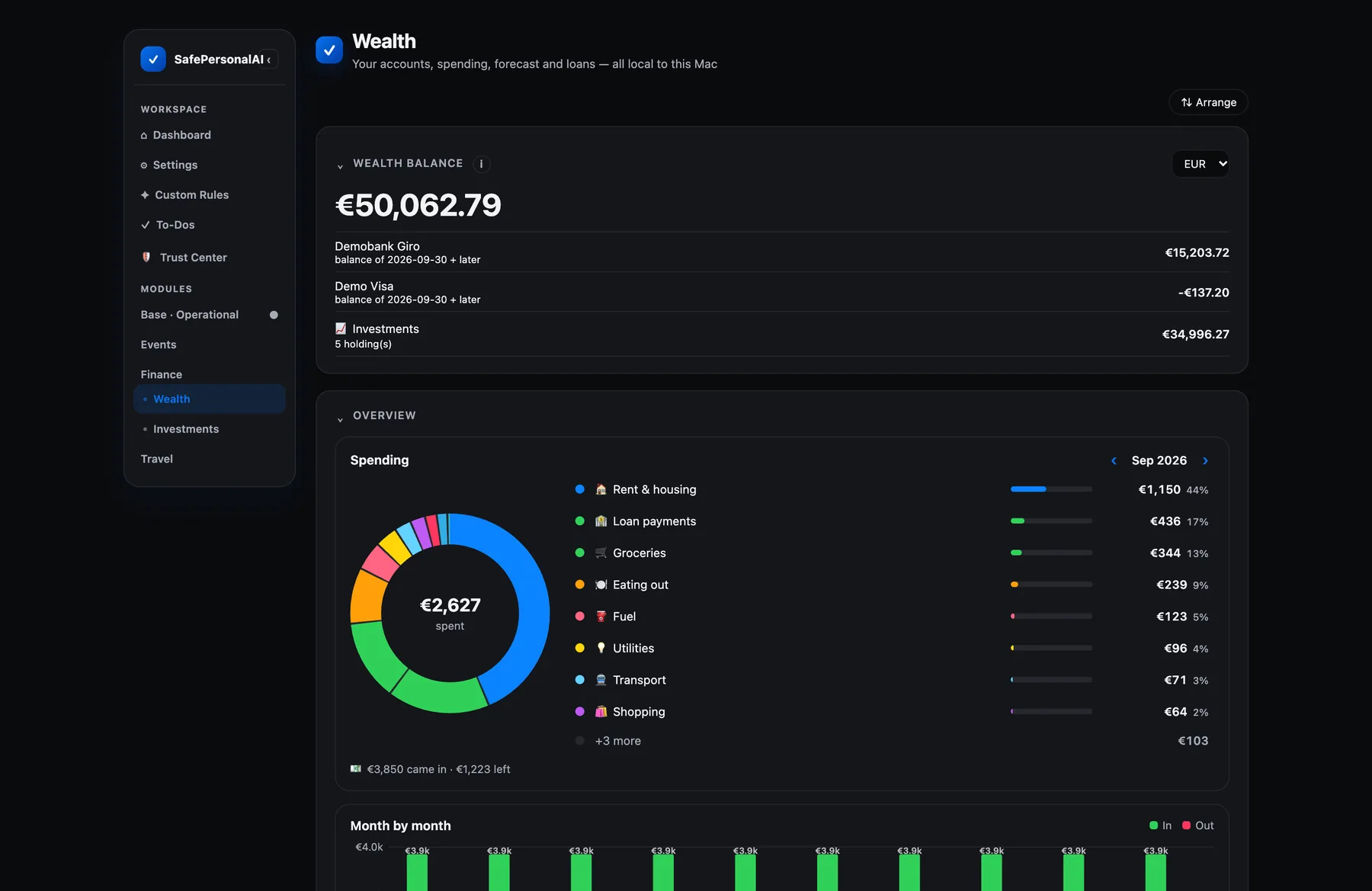
Every account in one balance
Checking account, card and investments together. Right below: where this month's money went, by category.
3 / 5
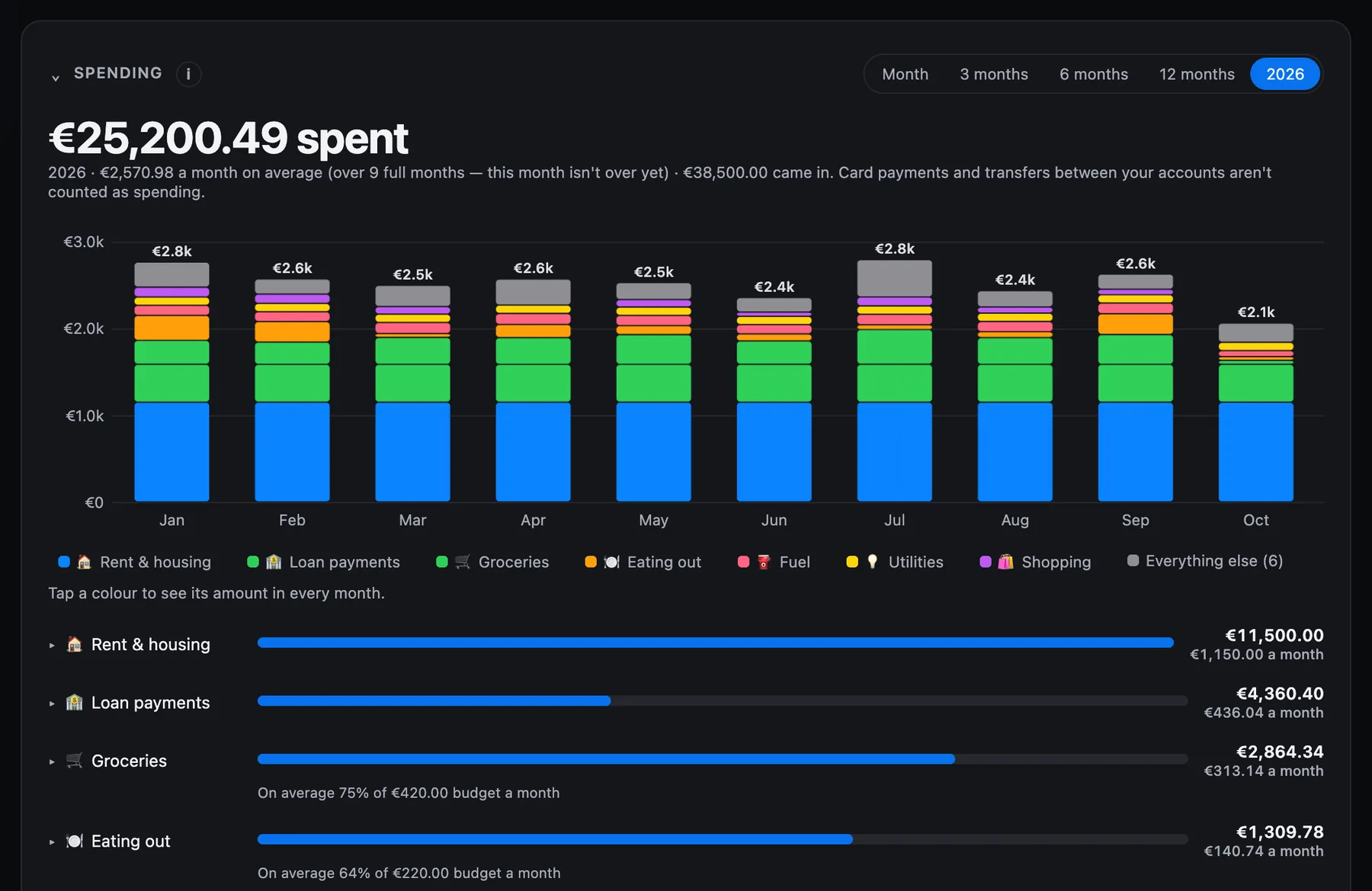
A whole year of spending
Month by month and category by category, with your budgets next to the numbers.
4 / 5
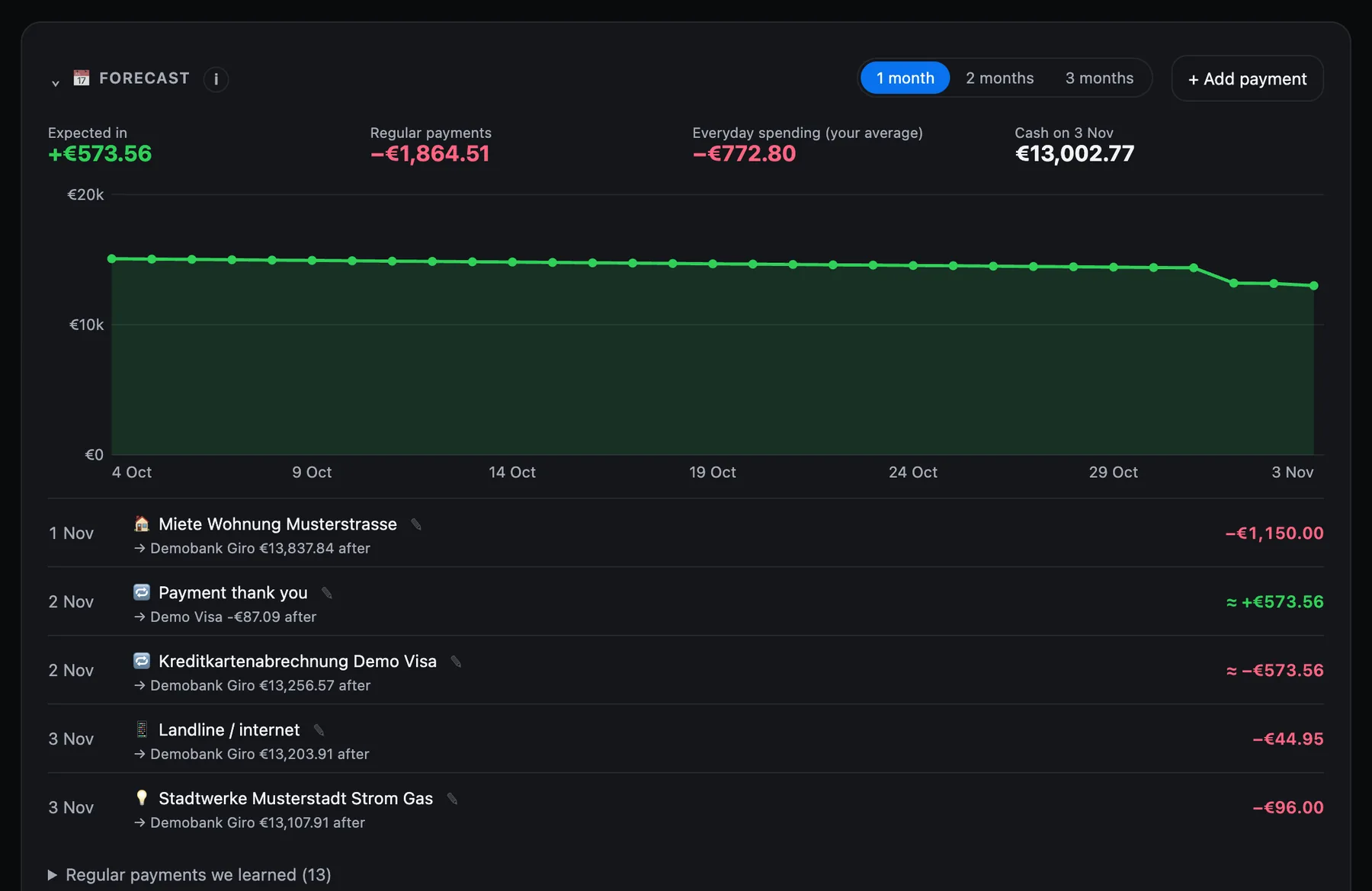
What the next month will cost
The regular payments it learned from your history, and the account balance after each one.
5 / 5
Your investments, today
What you hold, what you put in, and the gain or loss at today's prices.
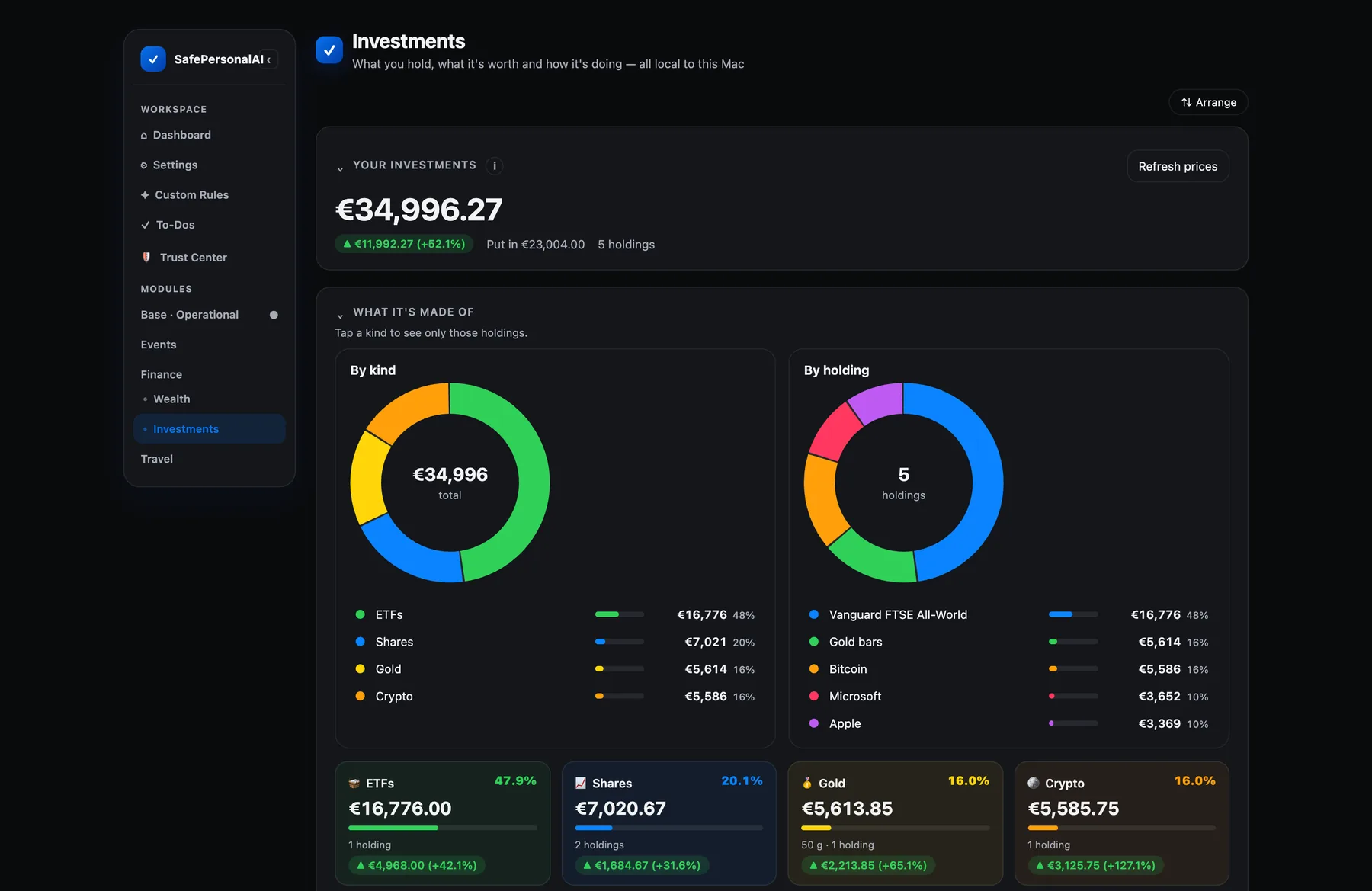
Sample data. Your own figures stay on your Mac.
Sample data. Your own figures stay on your Mac.
Quietly, in the background
It only wakes up when there's something for you to see.
No spinner, no dashboard you have to babysit — just a quiet light when something actually needs your say-so.
Own it, don't rent it
Your own private agent. Not another subscription.
SafePersonalAI turns the Mac already sitting on your desk into a private automation layer. Your working data stays local, your AI provider relationship stays yours, and the commercial terms stay visible before purchase.
Built for the Apple ecosystem you already own
No new hardware, no rented server, no third-party company hosting your life. It runs quietly on your own Mac, using the machine you already have.
Your AI provider, your boundary
Use Ollama locally with no account, or connect a supported cloud provider with your own key and pay them directly. Credentials stay on your Mac; SafePersonalAI never hides inference cost in a second subscription or silently falls back to a company-paid model.
Designed as software you own
Each module is a one-time, version-bound license rather than a permanent monthly rental. Free during the beta: every module is open for 90 days. After that, a one-time purchase: Base €19, Travel €15, Wealth €15 — or all three for €39. Buying opens soon.
A typical AI subscription
$24
$24/mo × 1 month — and counting, forever.
SafePersonalAI
$0/mo
One-time per module. Your Mac, your AI key — no platform fee, ever.
The boundary
A hard line between thinking and doing.
Most AI tools blur understanding and action into one step. We don't. What SafePersonalAI works out from your mail is a proposal until you approve it. Only what your own bank reports, and a few reminders, are added directly — marked, and undone with one click.
AI understands
It reads the email that arrived as untrusted data and extracts a proposed task, calendar event, renewal reminder, or supported module action.
You approve
Every proposed action lands in one review queue. You can approve, reject, delay, or provide missing information. Ambiguity never becomes permission.
Software acts
Only the approved fields are dispatched. Calendar actions cannot invite attendees; finance features record and forecast but cannot move money.
What it does
Start with everyday work. Add only what you need.
Base is the Operational foundation. Travel and Wealth extend the same private assistant without moving your history or creating another account.
Base module
Base
Everyday inbox, calendar, tasks, and your own rules.
Email → task
No more important request disappearing underneath newer email.
Calendar events
No more opening the calendar app just to type in a date.
To-dos & reminders
No more a deadline you swore you'd remember, quietly missed.
Your own simple rules
No more changing your routine to fit someone else's automation template.
Add-on module
Travel
Bookings, fare monitoring, and calendar-aware trip planning.
Add-on module
Wealth
Statements from any bank, spending, a forecast, budgets, and investments.
Bill & invoice tracking
No more digging through your inbox the night before it's due.
Cash-flow forecast
No more finding out you're low on funds after it's already happened.
Recurring cost watch
No more subscriptions quietly blending into the background.
Portfolio import
No more checking a broker app separately from everything else.
Every example here is something the Mac app does today. Each card opens a page with the details.
SafePersonalAI v1
One install. Free for 90 days. Then pay once.
Download the beta and every module is open for 90 days, free. After that each module is a one-time purchase — the Mac app has no subscription. A module you do not buy closes; its data stays on your Mac and comes back when you add it. Buying opens soon, and nothing is charged today.
Base
Operational foundation: inbox, calendar, iMessage, and to-dos.
- Inbox understanding with approval-ready tasks
- Calendar events from email, with no attendee invitations
- To-dos with deadline reminders
- One Pending Actions queue — approve, snooze, or reject
- Runs on your Mac with local Ollama or your own cloud-provider key
Included in the 90-day trial
Travel
Flight price tracking that never overspends its own budget.
- Daily quota-guarded fare tracking, per route
- Deal alerts only when a price actually clears your threshold
- Flexible-date and open-jaw search
- Shows whether the trip dates are free in your calendar
Included in the 90-day trial
Wealth
Your money, read from any bank's statement. No bank login.
- Any bank's statement: CSV, Excel, PDF, MT940, CAMT, OFX, QIF
- Spending by category, for any period
- Forecast of the next 1–3 months, with a below-zero warning
- Budgets, subscriptions found, unusual charges marked
- Investments and loans, with a Trade Republic import
Included in the 90-day trial
All three together: €39 one time. Buying opens soon — until then there is nothing to pay.
Free for 90 days, every module included · notarized by Apple · Apple silicon (M1 or later)
Trust
Built for people who don't trust AI with their inbox.
Your data stays on your Mac
The local action store, tasks, settings, and module data remain on your Mac. Content sent to a cloud AI provider goes directly under the provider account you chose; SafePersonalAI does not receive it.
Choose local or bring your own key
Ollama can run entirely on your Mac with no account or API key. Cloud options use your own provider account and key; SafePersonalAI stores that credential locally and sends requests directly to the provider you chose, never through a SafePersonalAI server.
Dangerous capabilities are absent
The commercial runtime cannot send email, invite attendees, click links, cancel services, or move money. Approval does not unlock a hidden path to those actions.
Check the Trust Center, any time
One page shows exactly what's connected, what it can and can't do, and where your data actually lives — not a promise you have to take on faith.
Gmail
Read only — cannot send
Google Calendar
Read + create events
Google Drive
Copies of statements you import
iMessage
Read locally on your Mac only
AI provider
Your own key — never shared with us
FAQ
Questions people actually ask.
What does it cost, and is there a free trial?
The beta is free to download, and every module — Base, Travel and Wealth — is open for 90 days. After that each module is a one-time purchase, not a subscription: Base €19, Travel €15, Wealth €15, or all three for €39. Buying is not open yet, so nothing is charged today. When the 90 days end, a module without a license closes and its data stays on your Mac. If you use a cloud AI provider you pay that provider directly; a local Ollama model has no AI bill.
Do I need my own Claude, OpenAI, or Gemini account?
No. You can use Ollama locally on your Mac with no cloud account or API key. If you choose Anthropic, OpenAI, or Gemini, you bring your own account and key and pay that provider directly. Some providers have a free allowance: at the time of writing, Google offers a free Gemini tier with daily limits, on which it may use what you send to improve its models. Prices, free allowances and data terms are the provider's own and change, so please check their official website before you choose. SafePersonalAI stores the key on your Mac, sends requests directly to the provider you selected, and never receives or passes on your key. Local and cloud models work behind the same approval step.
Isn't this just ChatGPT or Claude with extra steps?
No — and it isn't trying to be. A chat assistant answers when you ask. SafePersonalAI reads your new mail on its own, uses a model you choose to understand it, checks dates and amounts by fixed rules, and puts each proposed calendar entry or to-do in a list for you to approve. Its tools are deliberately narrow: it cannot send email, pay or click links.
What if it misreads something or proposes the wrong thing?
That's exactly what the approval step is for. You see the proposed result and the message it came from before anything happens. A date that isn't in the text is never invented, a calendar change needs an exact match with the existing entry, and the app cannot send email, invite attendees, click links, or move money.
Does my data train anyone's AI model?
SafePersonalAI does not train a model or receive your inbox content. When you choose a cloud AI provider, the relevant content goes directly from your Mac to that provider under its API terms. Review the provider's current data-use and retention policy before connecting it.
Does it run in the cloud, or on my machine?
On your machine. SafePersonalAI is Mac software today, not a hosted web app — it needs your Mac to be on to check for new messages and act on your approvals. There's no SafePersonalAI server holding your data in the meantime.
What Mac do I need to run SafePersonalAI?
The current beta requires a Mac with Apple silicon (M1 or later — including M1/M2/M3/M4 MacBook Air, MacBook Pro, Mac mini, iMac, and Mac Studio). Intel-based Macs are not supported by this build. macOS permission prompts are handled by macOS during setup; no separate SafePersonalAI account is required.
Can it send a message, invite someone, or move money without me?
No. The app has no way to send email, invite attendees, pay, cancel a service or click a link. Calendar entries are created without attendee notifications, and the money features only record what you approve and calculate forecasts.
What happens to my data if I stop using it?
It stays exactly where it always was — on your Mac and in your own mail and calendar accounts. You can remove SafePersonalAI's access in each account's security settings at any time, and there's nothing further for it to reach.