
Wealth
Your money, read from any bank's statement. No bank login.
Wealth reads the statement your bank already gives you — CSV, Excel, PDF, MT940, CAMT, OFX or QIF — works out the columns itself, and shows you what it read before anything is added. From there you get spending by category, a forecast of the coming months, budgets and your investments, all kept on your Mac.
Give it a statement
Choose a file on the Wealth page, or text it to yourself by iMessage. Any bank, any period — a whole year of history works. A screenshot of your banking app works too.
Check what it read
You see the transactions, the account they belong to and every assumption it made, before you click Import. Nothing is added without you.
See where it goes and what is coming
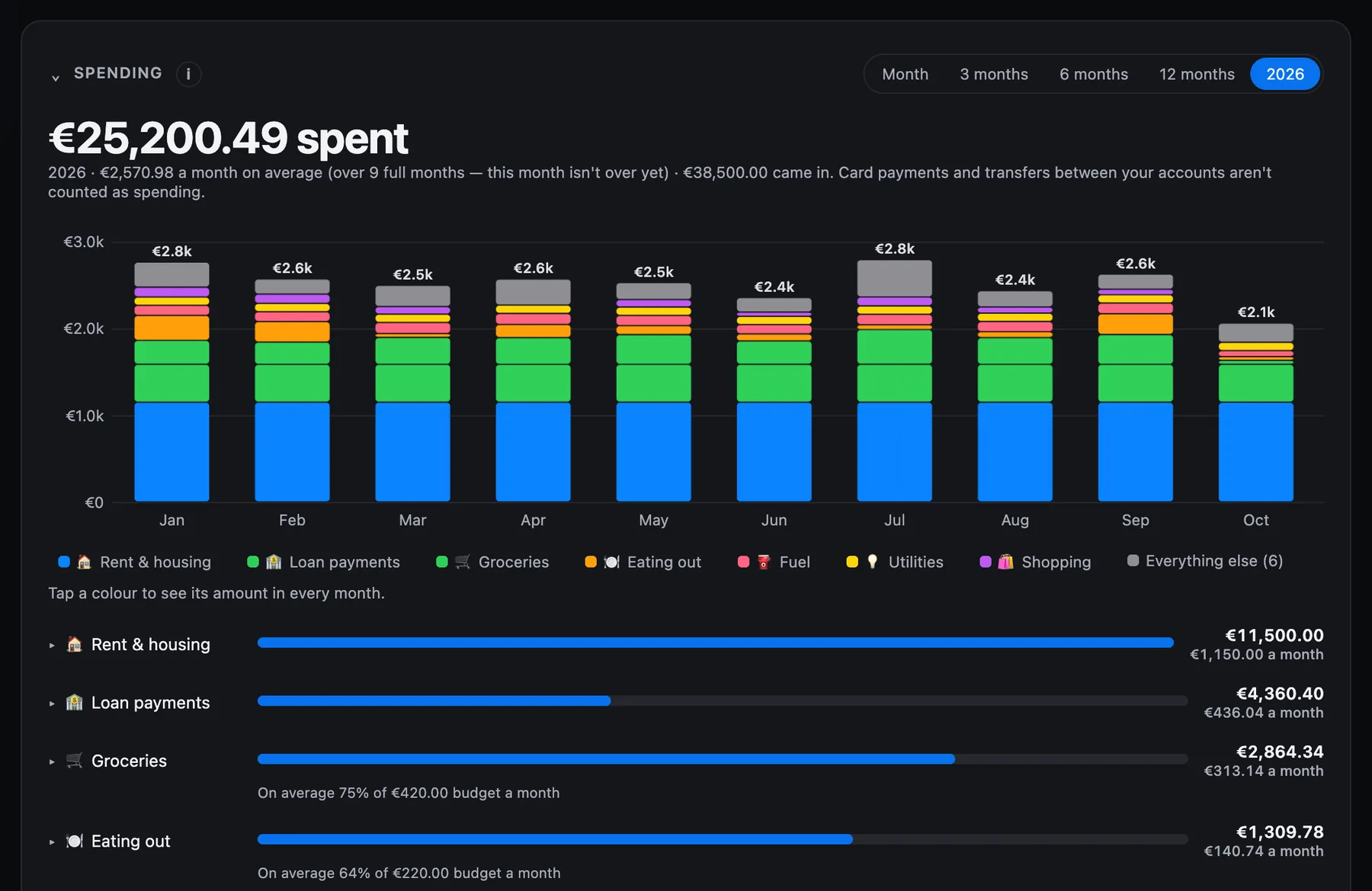
Spending by category for any period, the regular payments it learned from your history, and the expected balance for the next one to three months.
What you get
Any bank, any format
CSV, Excel, PDF, MT940, CAMT.053, OFX and QIF. No templates and no column mapping: it works out columns, dates, signs and currency itself. Tested on real İş Bankası PDF statements. A PDF must contain text; a scanned image is refused with a clear message.
Screenshots, read on your Mac
A screenshot of your banking or card app is read on your Mac with Apple's own text recognition and never uploaded. Transactions go to the review list; a balance waits for you to apply it to an account.
Spending you can read
Automatic categories, a chart by category, and money in and out month by month — for one month, the last 3, 6 or 12, or a whole year. Change a merchant's category once and it sticks.
A forecast from your own history
It learns what comes back every month — rent, loans, insurance, subscriptions, salary — and lists the next one, two or three months with the account balance after each payment. It warns when an account is expected to go below zero, and you can add payments you are planning.
Budgets
A monthly limit per category, with one message at 80% and one at 100% — not a reminder every day.
Subscriptions and unusual charges
The same merchant and amount every month is listed as a subscription. The same charge twice on one day, or one far above that merchant's usual amount, is marked as worth a look.
Investments on their own page
Shares, ETFs, gold and crypto: what they are worth today, what you put in, and the gain or loss. Trade Republic's transaction export is read directly; prices are updated where possible.
Loans, worked out
Enter any three of amount, rate, term and monthly payment and the fourth is calculated. You see the remaining balance, the payoff month and the total cost.
Every account in one balance
Checking, savings, card and investment accounts together, shown in any of 15 currencies. Each amount keeps its own currency; the conversion uses the daily ECB rates.
Tax hints for Germany
Once you choose your country, transactions that may matter for your tax return get a short hint, and one click exports the year for your tax advisor. Hints only — never tax advice.
What it reads
The statement your bank already gives you.
Wealth never connects to your bank and never asks for your banking password. You give it a statement file or a screenshot; it reads it on your Mac, puts it on the right account, and waits for you to click Import.
Investments
What you hold, and what it is worth today.
Enter your shares, ETFs, gold or crypto yourself, or import Trade Republic's transaction export and let it work out the shares and average cost. A holding with no current price counts at what you paid — never at a made-up value.
In the beta, still being proven
Three things are built and can be switched on, but have not yet run long enough on real mailboxes for us to promise them: statements picked up from your bank's emails, bank alert emails that update an account, and Apple Pay spending through a one-time iPhone Shortcut. Treat them as extras. Importing a statement yourself does not depend on any of them.
What Wealth does not do
It does not log in to your bank, pay anything or move money. It does not read scanned, image-only PDFs — a screenshot works instead. It does not give tax advice; your advisor decides. And it runs on your Mac, so your figures are not stored on a server of ours.